In a major push for women’s financial empowerment, the Maharashtra government has made e-KYC mandatory for all beneficiaries of the Mukhyamantri Majhi Ladki Bahin Yojana (also known as Ladki Bahin Yojana). This scheme provides eligible women aged 21-65 with ₹1,500 monthly via direct bank transfer (DBT) to promote economic independence. If you’re already registered, completing your e-KYC by November 18, 2025, ensures uninterrupted payments—miss it, and your installments could be paused. The process is quick, secure, and can be done online from home using your Aadhaar details. No more waiting in lines!
Complete e-KYC for Mukhyamantri Majhi Ladaki Bahin Yojana : Simple Step by Step Guide.
The e-KYC form you shared is straightforward: It asks for your Aadhaar number, a consent checkbox, and captcha. Here’s how to navigate it on the official site (ladakibahin.maharashtra.gov.in). If you’re not registered yet, start with account creation.
Step 1 : Visit ladakibahin.maharashtra.gov.in
After visiting on above given official website you will see this page 👇 . Then click on the box as show in image.
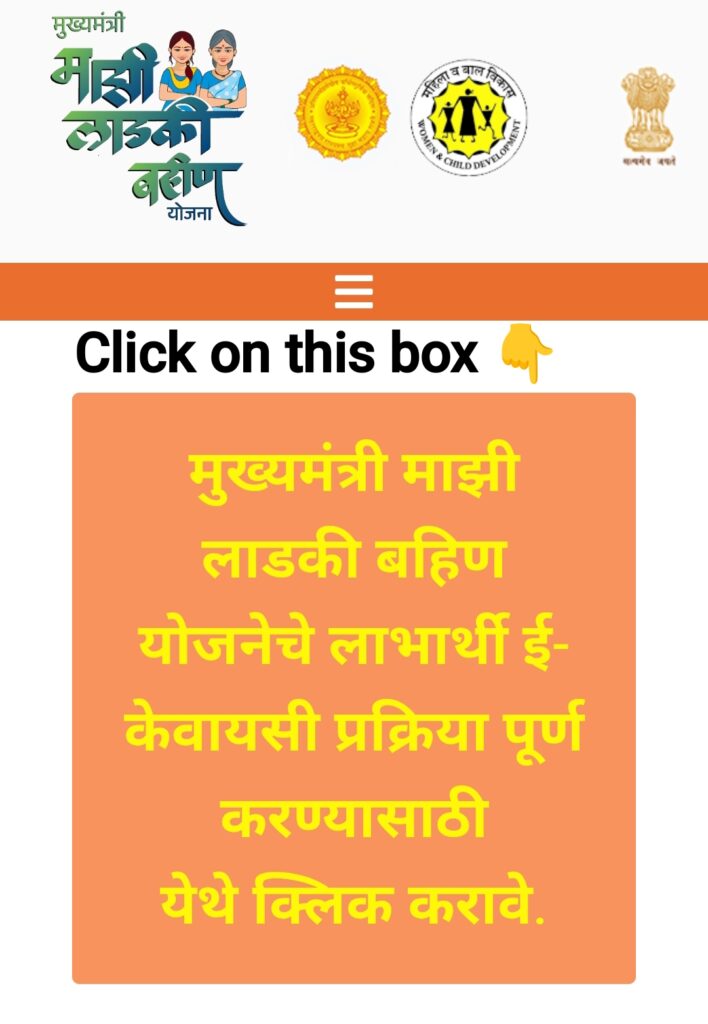
When you click on the box text link you will redirect on KYC page.
Step 2 : Enter Your (Applicant’s) Aadhaar Number
Now your KYC process has started. You need to fill your aadhar number in blank. As show in this image 👇
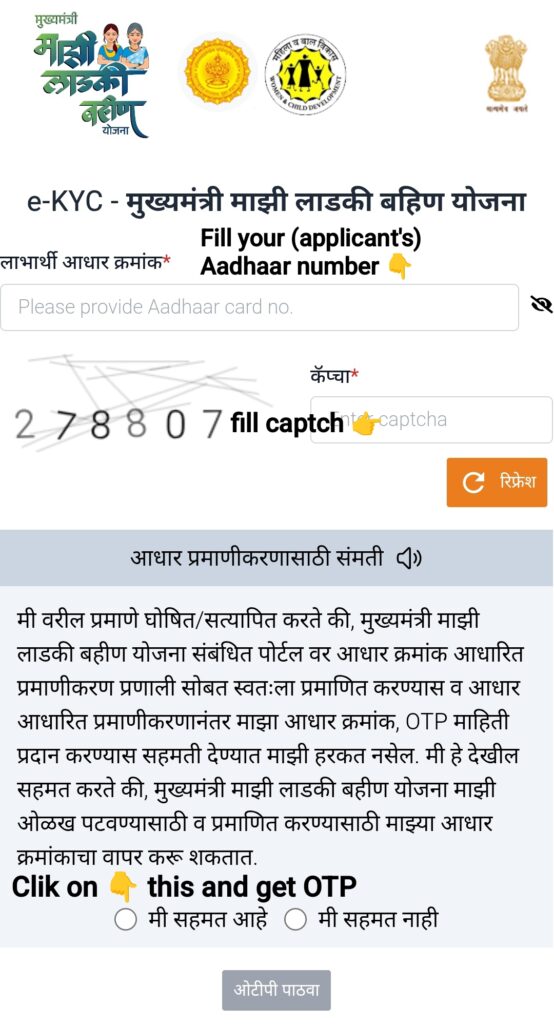
Enter your Aadhaar number them fill the captcha and click on (मी सहमत आहे) then you will get an OTP. When you get OTP you get redirected on OPT filling page. And then Enter your OTP carefully.
Step 3 : Fill your (Applicant’s) Father or Husband’s Aadhaar Number
After Enter the previous OTP correctly you will gets redirect again on Aadhaar Number filling page but this time not your aadhaar number needed, Rather your Father or Husband’s Aadhaar number fill as you have done .
Now Enter your Father’s or Husband’s Aadhaar Number as show in this image 👇
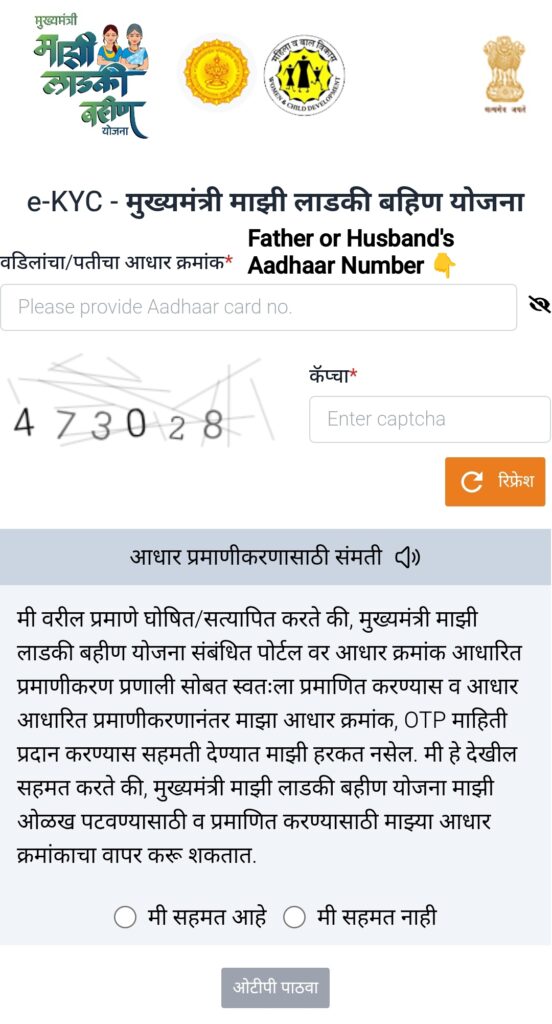
Enter your Father Or Husband’s Aadhaar number then fill the captcha and Click on (मी सहमत आहे) and get OTP. Then you get OTP and website redirects you on OTP filling page and you should fill OTP correctly.
Step 4 : Fill the Required information about you
After filling your and your fathe Or husband’s Aadhaar information correctly you get redirect on this main page of e-KYC👇
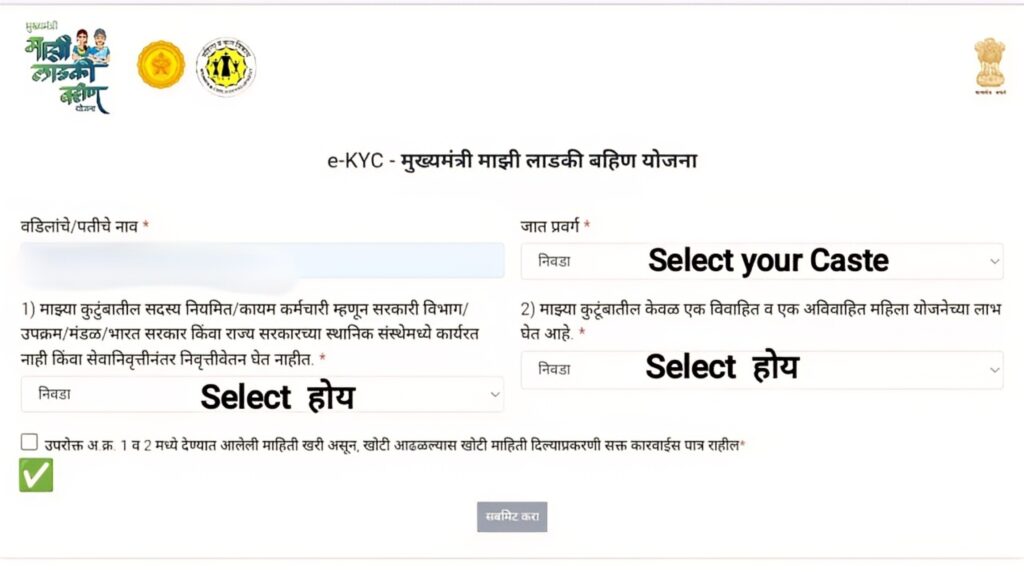
now here you should fill every detail very carefully.
• Fisrt select your caste from the given list after click on the option as shown in above image.
• Then click on the 1) and 2) select (होय) on both as shown in above image.
• Now click on box where (✅) mentioned in the image.
After doing all of those correctly you will see notification of KYC successful on the page.
Now your Ladki bahin yojna KYC is complete.
Common Problems in Ladaki bahin yojna e-KYC Process.
Many times you will see otp not coming problem, website traffic notification problem and even site not working problem. When you see all of these types problem didn’t get panic and try again after few hours.
When after trying many times you sees same problem again and again then our advice is try to do night time other than day time. Because day time website face huge traffic and busyness. And night time traffic gets down so site work better.